
Key takeaways
- AI implementation guides are typically written for engineers, not support leaders, which causes implementations to stall before they ever produce a single data point.
- The root cause of B2B implementation complexity is tool sprawl, where agents are forced to switch between multiple disconnected systems to solve a single ticket.
- While retrieval tools surface information faster when prompted, resolution systems actively participate in intake, triage, and escalation, helping move the metrics support leaders report on.
- Knowledge debt is the normal starting condition for every B2B support org, not a prerequisite to solve before AI implementation can begin.
- Stalled pilots share a predictable pattern—AI deployed beside the workflow instead of inside it, no baseline KPIs captured, and success criteria never defined before launch— and every one of those failure points is addressable before go-live, not after.
Every support leader I work with has a version of the same story. They've been asked to implement AI. They've read the guides. They've sat through the demos. And yet months later, they're still waiting on an engineering ticket, or they've launched something that’s not being used to its full potential.
A 2023 Gartner survey found that only 14% of customer service issues are fully resolved without human involvement. Despite a decade of investment in chatbots and ticket deflection tools, most support leaders already feel this gap firsthand. The legacy tools that created the problem were never designed to solve it.
The issue isn't a lack of AI options. It's that most AI implementation frameworks are written for technical buyers, not for heads of support, support ops managers, or directors of customer experience (CX). Across the dozens of B2B support teams I’ve worked closely with, the same pattern keeps repeating: The right intent but the wrong playbook, leading to a stalled pilot that never reaches its first data point.
What is AI implementation for support?
AI implementation for support is the process of embedding artificial intelligence into the ticket lifecycle (i.e., intake, triage, resolution, knowledge capture, and feedback), so that AI participates in resolving customer issues. In B2B support, this means deploying an AI support system that integrates into your current workflows, cuts manual effort at each stage, and delivers measurable improvements in the metrics your organization tracks. It's distinct from a search upgrade or chatbot deployment because it changes how a ticket moves through the system—who handles it, how fast it gets resolved, and what gets captured when it closes.
Why AI implementation keeps stalling before it starts
When support leaders fail, it’s usually because the resources they've been handed assume access to a technical infrastructure most support teams don't have. Here are three patterns I consistently see in stalled implementations:
1. AI implementation guides aren't built for support
Search for AI implementation frameworks on Google, and you'll find resources written for developer teams with dedicated AI engineers, large data pipelines, and months of runway to build and test. When a head of support or support ops manager tries to implement AI using one of these guides, the gap becomes immediately apparent. The technical know-how required to follow the steps simply isn't there, and there's no reasonable path to acquiring it without considerable outside help.
The steps don't translate. The metrics don't match. The tools require developer configuration to do anything useful.
This mismatch between who the guides are written for and who actually implements them can cause AI initiatives to stall before producing results. Teams that break this cycle typically start with a no-code agentic AI approach built for the operator, not for the engineer.
2. Tool sprawl is the root cause, not the symptom
Before a single AI tool enters the picture, agents in B2B support are already context-switching across multiple systems per ticket. Agents don't work from a single system of truth. They work across six partial ones, including a ticketing platform, an internal wiki, Slack or Teams, product logs, a customer relationship management (CRM) tool, and release notes. And these are often all open at once for a single case. The workflow is incredibly fragmented before AI even touches it, as described by my colleague Josh Solomon, General Manager and SVP of Revenue:
"Our tech stacks are absolutely insane. There isn't just a knowledge base we can rely on." — Josh Solomon, General Manager and SVP of Revenue, Mosaic AI
When context is scattered across numerous knowledge bases (KBs), it sets an AI system up to fail. An AI implementation that doesn't address this just adds an extra layer of complexity to an already convoluted process.
3. B2B support is inherently complex
B2B support serves organizations, not individual consumers. A single account can involve multiple stakeholders, products, and environments—each with its own configuration, version history, and escalation path. Add in multi-tier escalation chains and agent ramp times that often run nine to twelve months for multi-product roles, and the complexity gap between B2B support and a general IT help desk becomes clear. Any implementation framework built for the latter will underperform in the former.
This is why frictionless AI onboarding in B2B support requires more than just getting a tool live. The bar is getting the tool to work properly within the actual complexity of your organization's environment. That means AI is at the center of the workflow, not bolted on top of it. As Jamie Bergmann, Director of Solutions Engineering at Mosaic AI, puts it:
"AI-native companies build with LLMs at the center of the stack—not bolted on afterward." — Jamie Bergmann, Director of Solutions Engineering, Mosaic AI
What no-code AI implementation looks like for support teams
There's a version of AI implementation that a support ops manager can own, configure, iterate, and measure without filing a single engineering ticket. It just requires the right AI tools and a clear starting point. Here's what that looks like in practice:
Minimal dependency on technical resources
The most common implementation failure isn't a technology problem. It's a handoff problem. Support ops identifies a use case, submits requirements to product or engineering, waits weeks for a build, and launches with almost no capacity to iterate. By the time there's any data, the momentum is gone.
A no-code implementation model changes this entirely, as one of my colleagues so accurately states:
"If IT builds it but the line of business can't own it, adoption will break."
When support operations own the configuration, teams can test a workflow, measure its impact on a specific metric, and adjust in days instead of sprints. This is the first step toward true AI ownership.
Ownership of the AI roadmap
You don’t need a technical background to own an AI roadmap, so long as you can get crisp in these three areas:
- Which use cases to focus on
- How to measure whether they're working
- When to expand from a working pilot
In practice, a support ops manager can handle use case selection, intake configuration, similar-case tuning, workflow triggers, and adoption measurement—all without writing code or waiting on a ticket. The result is a roadmap that the support team lead can drive and expand quarter over quarter.
Governance without an engineering ticket queue
AI governance in a support environment doesn't require a gatekeeper in the engineering queue. IT's involvement is real but finite: Initial data source connections, SSO setup, and a security review before go-live. That work happens once. After that, support ops takes over entirely and owns the governance motion on an ongoing basis in the following four areas:
- Source controls that define what content AI draws from and how it's weighted
- Confidence thresholds that determine when AI defers to a human agent rather than generating an incorrect or hallucinated response
- Audit trails that log every AI-assisted action for review
- Escalation conditions that return a ticket to human handling based on ticket type, account tier, or customer sentiment
Data privacy and answer accuracy are the two risks enterprise support teams consistently raise before implementation. Both are manageable through configuration and should be treated as ongoing responsibilities rather than a one-time IT setup. When support ops owns governance, iteration is faster, and the guardrails remain in line with where the business actually is, not where it was when IT last touched the system.
Choosing the right AI platform
Before committing to any tool, the most important question to answer is: Can my team own this without engineering? If the answer isn't clearly yes, the dependency problem will still surface during the pilot. For a deeper look at what to evaluate when choosing a platform, see how no-code support automation criteria map to common B2B support requirements.
You can also find a practical breakdown here of what to look for in a no-code AI workflow builder for support teams before you begin evaluating options. But first, here are two important areas to consider when looking into the tools that are right for your support organization:
The importance of resolution over retrieval
Many AI tools on the market are retrieval tools: They surface relevant information when someone goes looking for it. That capability has real value. But retrieval alone doesn't move the metrics that matter most to a support leader—and understanding why is the key to avoiding a common implementation trap.
Resolution participation is when AI takes an active role in moving a ticket through the lifecycle, such as structuring intake, retrieving similar cases at triage, summarizing an escalation handoff, documenting the fix at close, and categorizing the ticket post-resolution. It's distinct from retrieval, which only surfaces information when an agent asks for it.
A tool that finds a knowledge base article faster is a search upgrade. A tool that uses artificial intelligence at each stage of the workflow is a resolution system. Generative AI and natural language processing (NLP) are what enable participation in resolution: They allow an AI agent to interpret intent, assemble context gathered from connected sources, and automate manual work at each stage.
The key benefits of AI in support are realized most effectively at the resolution layer. Teams that use AI only for retrieval tend to see incremental improvements in metrics such as mean time to resolution (MTTR). But teams that embed AI across the full lifecycle see reductions in escalation rate and backlog volume and reclaimed agent capacity.
How to fix the outdated knowledge base problem
Support teams frequently delay implementation because they assume that their AI requires a clean, complete knowledge base before it can do anything useful. But this line of thinking can delay implementation indefinitely and misunderstand how knowledge actually accumulates in a support environment.
In my experience, knowledge debt (e.g., undocumented workarounds, Slack-buried product updates, fixes that lived only in a senior engineer's head) is the norm for every B2B support org. Without accurate intake, search can't learn. Patterns can't emerge. Knowledge can't evolve. The lifecycle just resets and repeats. Waiting to fix that before implementing AI is the same as waiting for a condition that won't resolve on its own.
Among the key benefits of AI for knowledge management is its ability to automatically generate new content from real-time updates to the information you already have. For example, when an AI agent captures resolution data at ticket close, it automatically feeds back into the knowledge base. From there, cases are clustered, documentation gaps are identified, and draft articles are auto-generated for expert review before publication.
This feedback loop means a B2B support team doesn't need a perfect knowledge base to start. They need a system that improves with every ticket that closes.
Mosaic AI's approach to knowledge automation is built around the resolution cycle, treating every resolved case as an input into an improving knowledge base, rather than requiring a clean one as a prerequisite.
How do you know if AI implementation is working?
Typical AI adoption metrics, such as logins, seat licenses, and monthly active users, don't correlate with support outcomes. The measurement framework that actually holds up combines three things: Knowing which metrics to track, mapping implementation stages to those metrics before go-live, and then measuring whether AI materially participated at the ticket level.
Which metrics should AI implementation move?
The KPIs a support leader is measured on aren't the same as the ones a faster search affects. Here's what AI implementation needs to move in a B2B support environment:
- MTTR: The average time from ticket submission to full resolution
- First day resolution or FDR: Sometimes called first contact resolution or FCR, the percentage of tickets resolved without a follow-up or escalation
- Escalation rate: The share of tickets requiring involvement from a senior rep, subject matter expert (SME), engineer, or specialist
- Agent capacity reclaimed: The dollar value of time freed when AI handles repetitive tasks in the workflow
- Multi-turn depth: How many turns or exchanges a ticket requires before resolution
- Backlog volume: Open ticket count within a defined window, reflecting team capacity relative to inbound demand
According to Salesforce's State of Service report, 80% of support agents say better access to data from other departments would improve their ability to serve customers. In B2B support, that gap shows up directly in live ticket work, with agents piecing together information from disconnected systems while a customer waits. Quicker retrieval reduces some of that friction, but only if all the organization’s KBs are connected. And it won't change escalation rate, backlog volume, or agent capacity reclaimed, because those metrics are driven by what happens before and after the search, not during it.
When to map implementation stages to your KPIs
Every stage of a no-code implementation is designed to move a specific metric. Mapping them before go-live provides support leaders with a business case and teams with a clear definition of what success looks like at each phase.
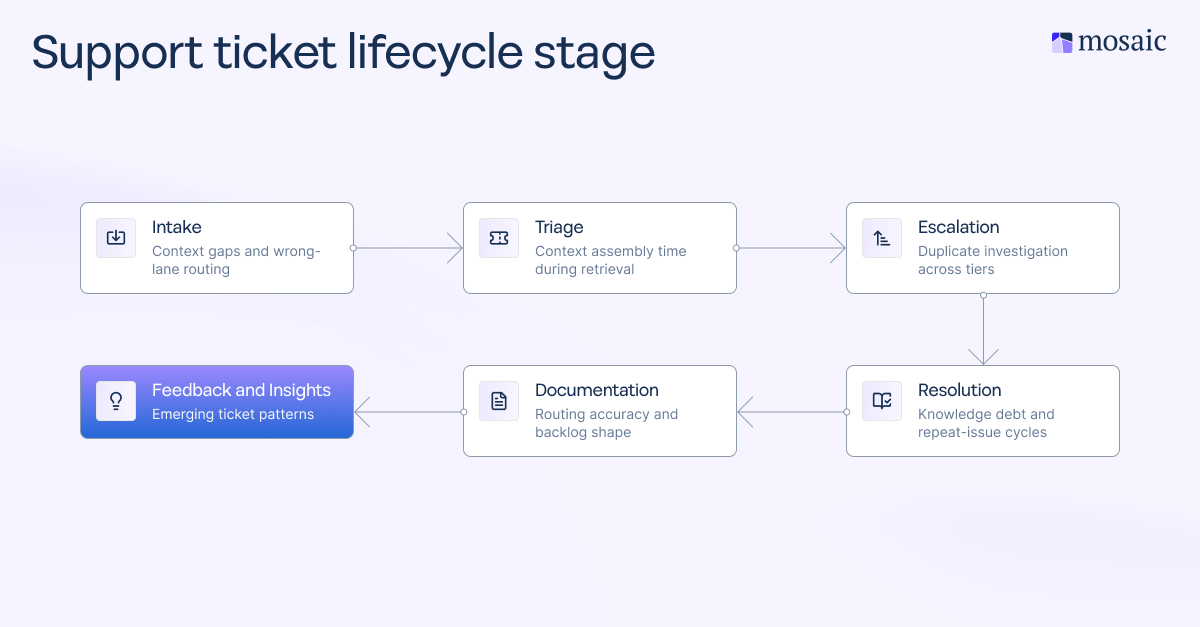
The ROI benchmarks B2B support leaders use to build the business case
Before presenting a business case, establish your baseline. Capture MTTR, FDR, escalation rate, ticket volume, and agent capacity reclaimed before deployment. A before-and-after comparison grounded in your own numbers is more persuasive to a CFO or Chief Customer Officer (CCO) than any vendor benchmark. That way, you can really see how far you’ve come thanks to an AI implementation.
Rapid7, a global cybersecurity company with more than 500 support agents, deployed Mosaic AI across support, customer success, and solutions engineering and had a very clear goal in mind: Create more capacity across their three frontline teams while working toward achieving a CSAT of 95%. And they were able to do that once they adopted an "Ask Mosaic AI first" policy.
How to recognize and recover from a stalled AI adoption pilot
Most AI pilots fail before they ever have the chance to prove themselves. Here are some warning signs that an AI pilot is losing momentum:
- AI-assisted ticket rate is flat or declining after week two
- Agents reverting to Slack threads or direct SME pings for answers that the AI should handle
- No KPI movement in the first four weeks
- Adoption conversations centered on the tool, not on outcomes
It’s also hard to know where you stand if you don't define what success looks like before the pilot starts. The absence of a baseline metric and a defined success threshold can cause a pilot to lose internal support before it produces data.
5 reasons AI implementation fails before it proves value
The future of AI in B2B support belongs to teams that treat implementation as an operations decision, not an IT project. Based on my experience working with support teams, there’s a recognizable pattern:
- AI is deployed beside the workflow instead of inside it
- No baseline KPIs captured before launch, leaving nothing to compare against
- Agents weren’t shown what changes in their daily ticket workflows
- Implementation is owned by IT or a product team, not support operations
- Success criteria were never defined before the pilot started
These aren't inevitable outcomes. That’s why each of these areas needs to be addressed before go-live. The support teams moving fastest with AI right now are the ones who treated these as pre-launch checklist items rather than post-mortem findings.
How to restart a stalled pilot
Recovery doesn't require engineering involvement. Start by narrowing the scope to one ticket type or team segment. Then make sure every AI-assisted ticket is logged and flagged for measurement, so you have a clean dataset to compare against your baseline. Next, run a focused two-week sprint with a volunteer group of power users and set one KPI target for that window, such as the escalation rate for a specific ticket category. Use that as the proof point to expand.
The stage-to-KPI table from earlier in this article is a useful starting point. The goal isn't to automate everything at once. It's about focusing on higher-value outcomes, proving them with real data, and building out from there.
The AI roadmap that support leaders are built to own
AI implementation in support shouldn’t be a one-time IT project with a go-live date. It's an iterative process, with the first ticket resolved with AI in the loop as the proof point to build on. The teams winning at this aren't the ones with the deepest engineering resources. They're the ones who started with a clear metric target, owned the configuration from day one, and iterated from real ticket data.
That's what it means to treat AI as a business operations decision instead of a technology project. And it's the model that compounds over time.
Frequently asked questions
Will AI completely replace human IT support agents?
No—and this is especially true in B2B environments, where complex issues, version dependencies, and multi-stakeholder account ownership require human-in-the-loop judgment at critical decision points. The realistic role of AI in B2B support is to remove high-volume, repetitive tasks, so agents can focus on higher-value work. Teams that implement AI well consistently report that agents deal with more complex work, not less.
What are the security risks of using AI in support?
The primary AI security risks include data exposure, response accuracy, and loss of control over what AI communicates to customers. This can be mitigated with source controls, confidence thresholds, audit trails, and role-based access. Data privacy should be treated as an ongoing configuration responsibility, not a one-time IT setup. Enterprise-grade AI implementations always include these controls as standard operating procedure before going live, not optional features.
How long does it take to implement an AI support system?
With a no-code, support-operations-owned approach, a functional pilot can be live in under a week. Full implementation generally takes under 30 days. The bottleneck in most stalled rollouts is integration complexity and unclear ownership, not necessarily the technology itself. Teams that define their first use case, capture baseline KPIs, and connect their core systems before go-live consistently reach meaningful data faster.
How does Mosaic AI help B2B support teams implement AI?
Mosaic AI is built specifically for B2B support teams that need to implement AI without engineering involvement. It connects to the tools support teams already use (e.g., ticketing systems, CRM platforms, knowledge bases, and Slack) without custom development. Here’s how it further supports AI implementation across the ticket lifecycle:
- Structures intake to capture the right context before triage begins
- Retrieves similar cases to surface relevant resolved tickets and recommends next steps during active ticket work
- Summarizes escalations to keep the diagnostic context intact during handoffs
- Captures resolution data at close to extract root cause, fix, and environment data
- Re-categorizes tickets post-close based on actual resolution data rather than intake guesses
- Automates knowledge article generation to turn resolved cases into up-to-date knowledge base content for expert review
What are the key benefits of AI knowledge base automation with Mosaic AI?
Mosaic AI treats knowledge base management as a continuous, AI-driven process rather than a periodic manual effort. As tickets resolve, Mosaic AI clusters cases, identifies documentation gaps, and generates draft knowledge articles for expert review. This process keeps the knowledge base current without requiring a separate team to maintain it. This is particularly important in B2B support, where product complexity and frequent updates mean knowledge debt accumulates faster than most teams can address manually.